
PROJECT MANAGEMENT – Filer Module

Online installation available
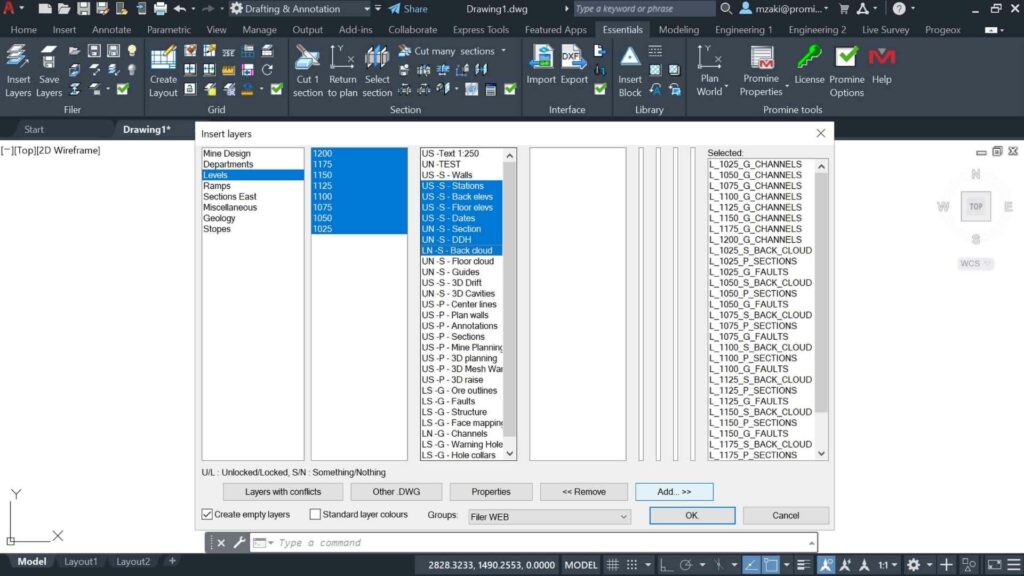

AutoCAD plugin for drawing management and organizing layers.
A project management tool to organize your drawings for your team. Connect to a local server, OneDrive or Google Drive and add unlimited users to your account for managing drawing-level permissions. Manage layer permissions and avoid conflicting copies of common work.
This module allows you to:
- Insert Promine Layers.
- Save Promine Layers.
- Insert a Sibling Layer.
- Update Promine Layers.
- Remove Layers from the Current Drawing.
- Select Layers to Turn On.
- Select Layers to Turn Off.
- Change the layer of an object.
- Open a Promine Drawing.
- Save a Promine Drawing.
- Save a Promine Drawing as.
- Prompt the convention for information pertaining to the picked Promine layer.
- Copy an object to a new layer.
- Fuse active drawing layers with another chosen layer of the convention.
- Purge a Layer.
- Use a memory aid for complex conventions.
- Manage/Retrieve References.
- Open drawings of type dxf and dwg, updates Promine layers, then saves and close the drawing.
- Login to Promine as another user.
This module is provided as an on-going subscription based on your choice of time period and number of licenses.
Licenses for this module are provided in batches of 5. This means the first available batch is 1-5 licenses, then 6-10 licenses, and so on. Multiple licenses allow users to run Promine simultaneously.
You may install Promine on an unlimited number of devices, but the number of simultaneous users depend on the number of licenses you choose. The available time periods are 3 months, 6 months, 9 months and 12 months.
The installation and licensing can be done online; there is no need for on-site setup and installation. You may request a Promine representative to come on-site to perform the full setup and installation; Otherwise, this can be done online.
We understand that you may require a few functions to finish your project. This is why we introduced the concept of “À la carte”. You can pick and choose the modules suitable for your project, the time period and the number of licenses in batches of 5.
This module is part of the Project Management Category. Manage all your drawings and plans in one place. For drawing management, branded layouts, printing, section cutting and storing lists of valuable blocks.