
ENGINEERING – Raise Design Module

Online installation available
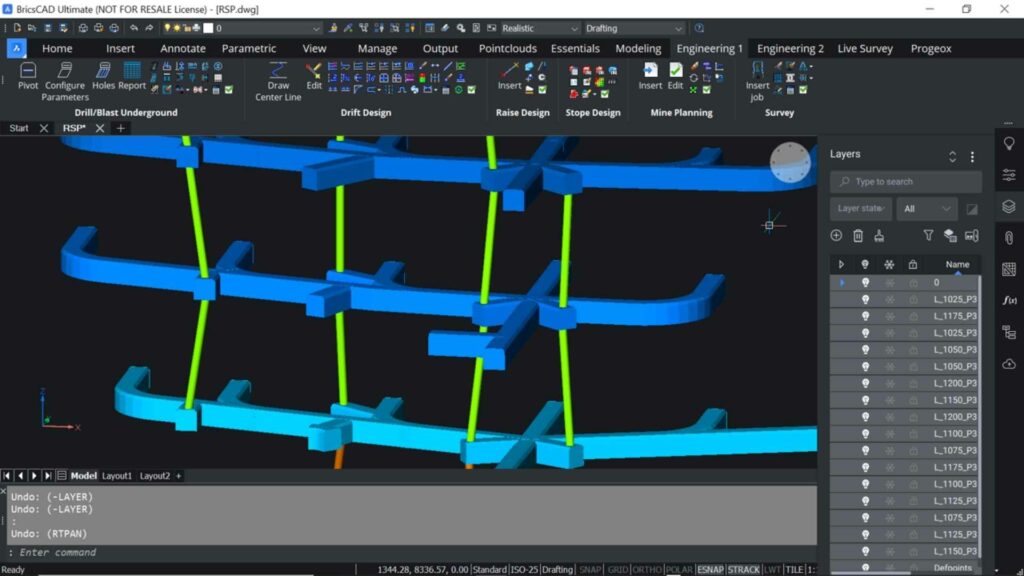

Connect underground workings by creating a raise in different shapes. Annotate and model designs easily.
This module allows you to:
- Insert a raise center line in 3D.
- Create the 3D model of the raise.
- Annotate the raise name, dip, length, coords, etc.
- Compute the tonnage of a raise 3D model.
- Change the drawing view to look down (or up) in the raise enabling user to see if raise intersects other objects.
- Restore the view that was in use before using the View on axis command.
This module is provided as an on-going subscription based on your choice of time period and number of licenses.
Licenses for this module are provided in batches of 5. This means the first available batch is 1-5 licenses, then 6-10 licenses, and so on. Multiple licenses allow users to run Promine simultaneously.
You may install Promine on an unlimited number of devices, but the number of simultaneous users depend on the number of licenses you choose. The available time periods are 3 months, 6 months, 9 months and 12 months.
The installation and licensing can be done online; there is no need for on-site setup and installation. You may request a Promine representative to come on-site to perform the full setup and installation; Otherwise, this can be done online.
We understand that you may require a few functions to finish your project. This is why we introduced the concept of “À la carte”. You can pick and choose the modules suitable for your project, the time period and the number of licenses in batches of 5.
This module is part of the Engineering Category. For mine design, planning, scheduling, drill-and-blast, stope design, surveying, dilution and pit planning basics.