
ENGINEERING – Drill/Blast Underground Module

Online installation available
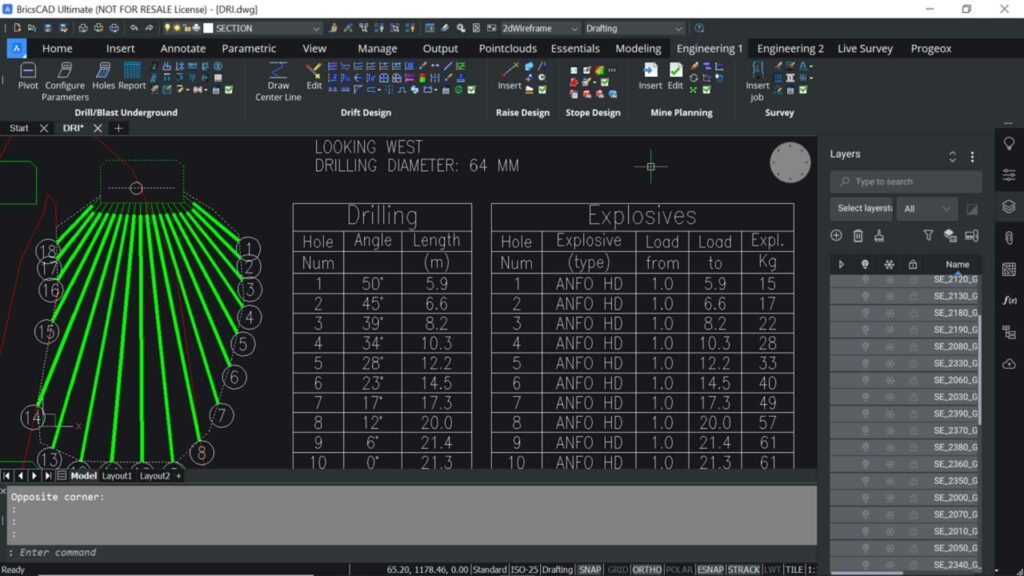

Design drill-and-blast plans and insert reports showing lengths, explosives weight, safety distance, etc. Calculate powder factors and generate an energy analysis to determine optimal rock breakage.
This module allows you to:
- Position the drill in the drift.
- Select pivot, drift and stope outline.
- Insert holes in stope.
- Insert a drilling/blasting report.
- Change hole dip/length.
- Show another section on the current section.
- Erase all reports and all information on a selected layer.
- Set the depth of a hole.
- Mark selected hole as breaking through an opening.
- Extend/Trim holes at the intersection with a 3D mesh.
- Add remote drilling distance in report.
- Convert a polyline into a drill hole.
- Erase all the holes on a selected layer.
- Insert a coordinate line in the drawing.
- Insert section name, angle and view direction in drawing.
- Put the UCS on a section in order to cut a section with Current UCS.
- Display selected holes in plan view.
- Display the sections in the plan view.
- Execute a selected custom command of the underground dilling and blasting module.
- Rescan the drawing for drilling and blasting objects.
- Load holes with explosives.
- Move the load in a hole.
- Edit the explosive load of a hole.
- Compute the amount of explosive per tonnes in a section.
- Show the distribution of energy on a blasting section.
- Erase the blocks of an energy analysis.
- Compute the total length of drilling, explosive and stemming in a blast.
- Remove explosive from selected holes.
- Create delay blocks from selected holes.
- Add delays in a staged column of explosive.
- Set the scale of the delay blocks
- Set the rotation of selected delay blocks.
- Add even space between selected delays by a fence. Delays will be spread along the fence points.
- Set the delay number of a hole.
- Set a delay time according to firing sequence.
- Transfer delay number and time from collar delay blocks to bottom delay blocks and vice versa.
- Set delays time or add time to selected delays.
- Show how much explosive weight is firing at a given time in a blast.
This module is provided as an on-going subscription based on your choice of time period and number of licenses.
Licenses for this module are provided in batches of 5. This means the first available batch is 1-5 licenses, then 6-10 licenses, and so on. Multiple licenses allow users to run Promine simultaneously.
You may install Promine on an unlimited number of devices, but the number of simultaneous users depend on the number of licenses you choose. The available time periods are 3 months, 6 months, 9 months and 12 months.
The installation and licensing can be done online; there is no need for on-site setup and installation. You may request a Promine representative to come on-site to perform the full setup and installation; Otherwise, this can be done online.
We understand that you may require a few functions to finish your project. This is why we introduced the concept of “À la carte”. You can pick and choose the modules suitable for your project, the time period and the number of licenses in batches of 5.
This module is part of the Engineering Category. For mine design, planning, scheduling, drill-and-blast, stope design, surveying, dilution and pit planning basics.